Auto Reframe vs Split Screen: Framing a Two-Person Video for 9:16
A wide shot of two people at a table is 16:9. A phone is 9:16. Something has to give, and the choice changes how the clip feels. goodgoodclips.com has five layouts; these are the two that matter for conversations, and when to pick each.
Auto reframe: follow whoever is talking
Auto reframe tracks faces frame by frame, works out who is speaking and moves the crop to them, cutting cleanly when the conversation switches. It is the default, and it is the right choice when one person carries the moment: a story, an explanation, a monologue. The speaker fills the frame, which is what you want on a small screen.
Split screen: keep both people visible
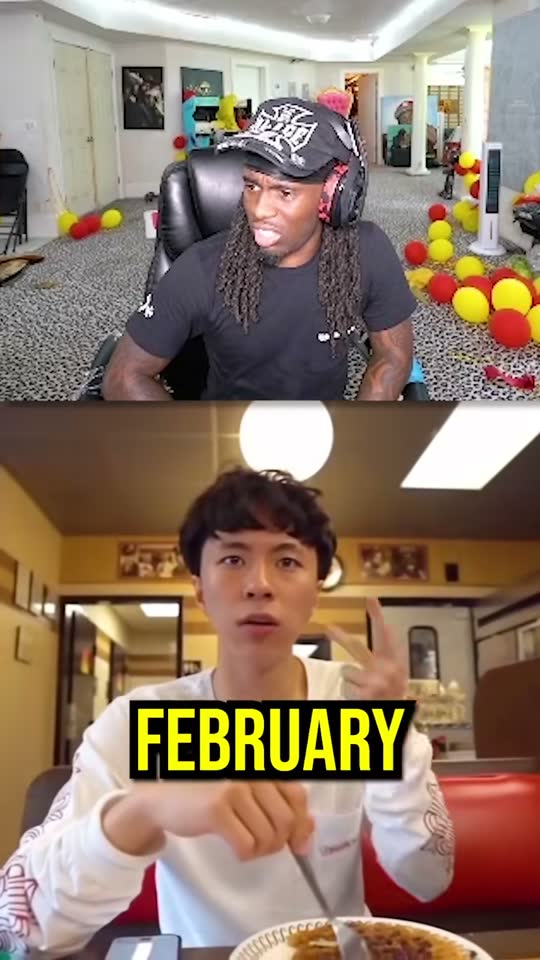
Split screen takes two people who are side by side in the original and stacks them, one above the other. Use it when the reaction is half the moment: a joke, a disagreement, a surprise. Cropping to the speaker alone would hide the other person's face exactly when it matters.
Split screen needs two people visible side by side in the source video. When they aren't, the clip falls back to following the active speaker.

A rule of thumb
- One person talking for most of the clip: auto reframe.
- Fast back-and-forth, or a visible reaction: split screen.
- The video already cuts between separate camera angles: auto reframe keeps each shot centred on the face in it.
The other three layouts
- Fit with blur shows the whole frame on a blurred copy of itself. Use it for slides, screen recordings and gameplay, where cropping would cut off something important.
- Center crop is a fixed crop from the middle, for a single speaker who doesn't move.
- Manual is a fixed crop where you place it, for a presenter who sits off to one side.
You can change the layout for any clip in the editor, preview it and re-render. Re-rendering doesn't use credits. There is more on the auto reframe page.