Finds the moments worth sharing. Claude reads the whole conversation, scores each moment on seven criteria and tells you why it picked it.
The Spikes Studio alternative for streams and podcasts.
Spikes Studio is an AI clipper with a free plan and a built-in social scheduler. goodgoodclips is built for long recordings: it reads the whole stream or podcast, explains why it picked each clip and gives every paid plan the same editor. Here is how the two compare.
Plans from $14.50/month billed yearly · Spikes Studio details checked November 16, 2026
At a glance
goodgoodclips vs Spikes Studio
A tick marks the tool that does better on that row. Rows without one are a draw.
| Feature | goodgoodclips | Spikes Studio |
|---|---|---|
| Why a clip was picked | A score on 7 named criteria plus a written reason for every clip | An AI virality score |
| Editor | The same editor on every paid plan; edits never use credits | Basic editor on Free, premium editor on Enterprise |
| Project storage | 30, 60 or 90 days by plan | 7 days on Free, 90 days on PRO+, unlimited on Enterprise |
| Free plan | No. Paid plans from $14.50/month billed yearly | Yes: demo clips, with a watermark and 720p export |
| Price | From $14.50/month billed yearly, for 250 minutes a month | PRO+ at $14.09/month billed yearly, for 3,600 minutes a year |
| Posting to social | Download and post yourself | Social media scheduler on PRO+ |
| Languages | 16 | 99+ |
Why switch
Why creators pick goodgoodclips as their Spikes alternative
You see why each clip was picked
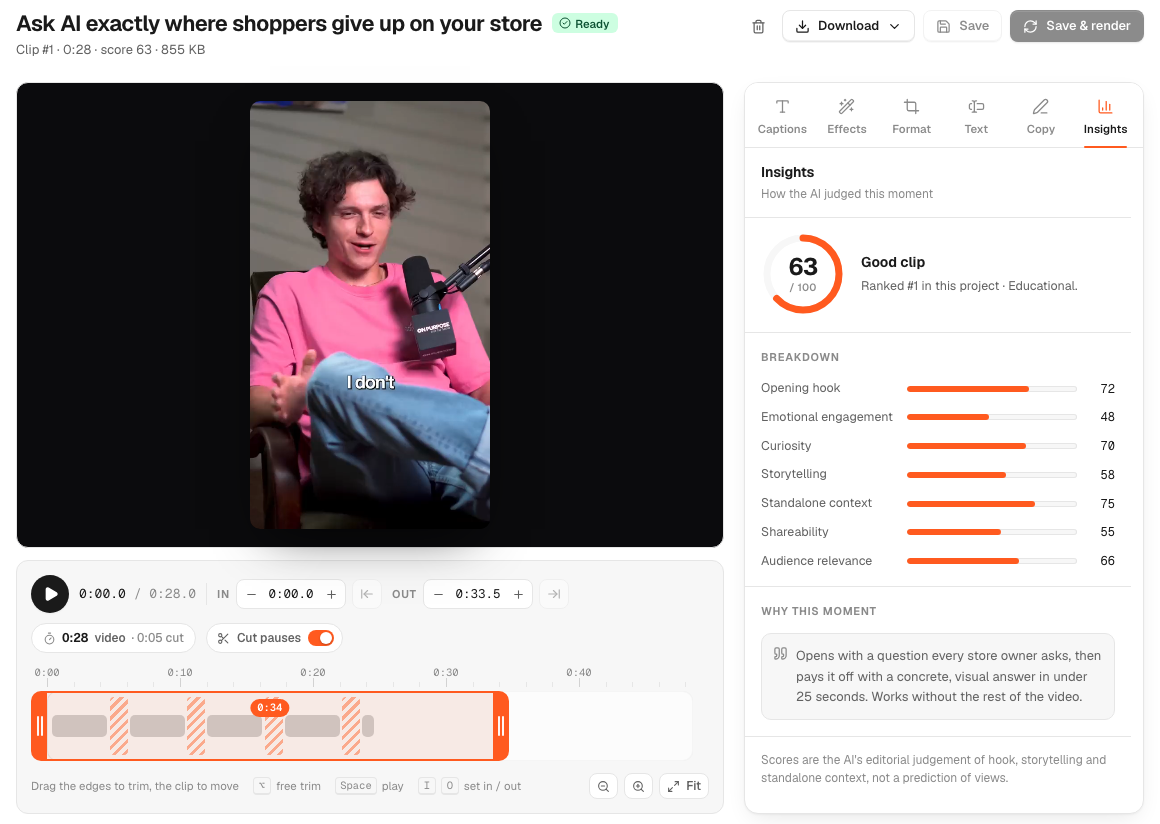
Every clip shows its score on seven named criteria, from the opening hook to standalone context, plus one sentence on what the hook and the payoff are. You can judge a clip without rewatching the stream.
Built for long recordings
goodgoodclips reads the whole video, up to 2, 3 or 4 hours by plan, so a story that builds over ten minutes of a stream can still end up in one clip.
Made for conversations
Auto reframe follows whoever is speaking, and split screen stacks two people top and bottom, so podcasts and duo streams keep both faces in the clip.
Edits never cost credits
Credits are only used when a new video is analysed. Trimming, recaptioning, reframing and re-rendering a clip are free, as many times as you like.
Cleaner audio and captions
Filler words are cut from the audio and captions (English), pauses can be removed, and every export is levelled to −14 LUFS with light noise cleanup.
Point it at a topic
Describe what you're after in “Find clips about”, such as “the boss fight” or “the story about my first stream”, and matching moments come first.
Everything between upload and post, handled.
The AI picks the moments, frames them for phones, captions every word and writes the post. Every part stays editable.

Captions timed to every word. Six styles, a highlighted key word on each line, 16 languages.

Keeps whoever is talking in frame. Face tracking and active-speaker detection turn 16:9 into 9:16.
Two people, both visible. Side by side becomes top and bottom.
Cuts the “um”s. Removed from the audio and the captions, for English.
Title, caption and hashtags, written. For TikTok, Reels and Shorts.
The editor
Fine-tune any clip before you post.
Trim on word boundaries, cut pauses, restyle captions, change the framing and see how the AI scored the moment. Re-rendering never uses credits.
Pricing
Pricing compared
goodgoodclips
- Creator$29/mo250 minutes/month · $14.50/mo billed yearly
- Pro$79/mo700 minutes/month · $39.50/mo billed yearly
- Agency$189/mo1,500 minutes/month · $94.50/mo billed yearly
No free plan. 1080p, no watermark and every editing feature on every plan.
Spikes Studio
- Basic$0Demo clips, watermark, 720p export, auto-captions, basic editor
- PRO+$14.09/moBilled yearly: 3,600 minutes a year, no watermark, 1080p, social media scheduler
- Enterprise$56.34/moBilled yearly: 14,400 minutes a year, custom templates, account manager, unlimited storage
As published on Spikes Studio's pricing page, November 16, 2026.
Spikes Studio alternatives: FAQ
What is the best Spikes Studio alternative?
If you clip long streams, podcasts or interviews and want to see why each clip was chosen, goodgoodclips is built for that. It reads the whole recording, up to 2, 3 or 4 hours by plan, scores every clip on seven criteria and gives every paid plan the same editor.
Is there a free Spikes Studio alternative?
goodgoodclips doesn't have a free plan; it starts at $14.50 a month billed yearly. Every clip is 1080p with no watermark, and projects are kept at least 30 days. Spikes Studio's own free plan gives you demo clips with a watermark and 720p export.
How do the prices compare?
Spikes Studio's PRO+ plan is $14.09 a month billed yearly for 3,600 minutes a year. goodgoodclips starts at $14.50 a month billed yearly for 250 minutes a month, with 700 minutes on Pro and 1,500 on Agency. Per minute, Spikes Studio's PRO+ plan is cheaper.
Can I paste a Twitch link?
You can paste it to import the title and thumbnail, but goodgoodclips doesn't download from Twitch, YouTube or X. Download your VOD from Twitch Video Producer (or your Kick dashboard) and upload it. Direct links to video files you own are fetched automatically.
Spikes Studio is a trademark of its owner. goodgoodclips is not affiliated with, endorsed or sponsored by Spikes Studio. Spikes Studio details come from its own website, checked on November 16, 2026, and may have changed since: Spikes Studio pricing, Spikes Studio homepage and FAQ.